MySQL Directory Layout and Configuration Principles
This article is intended for users who are using dbbot for the first time to help them quickly understand the directory structure, configuration entry and execution logic of mysql_ansible.
If you are looking at the overview structure of the dbbot repository, please read first: dbbot repository directory structure and component description.
1. Top-level directory
Typical installation path:
/usr/local/dbbot/mysql_ansible
Key directory:
downloads/: database installation package directory.inventory/: Target host inventory.playbooks/: script and parameter entry.roles/: specific task implementation.
2. mysql_ansible structure
mysql_ansible/
├── downloads/
├── inventory/
│   └── hosts.ini
├── playbooks/
│   ├── common_config.yml
│   ├── advanced_config.yml
│   ├── single_node.yml
│   ├── master_slave.yml
│   ├── mha.yml
│   ├── mgr.yml
│   ├── backup_script.yml
│   ├── backup_script_8.4.yml
│   ├── restore_pitr_8.4.yml
│   ├── install_xtrabackup.yml
│   └── install_mysqlshell.yml
└── roles/
3. Configuration file responsibilities
3.1 inventory/hosts.ini
Used to define the target host and connection parameters. The default test environment can be written first:
[dbbot_mysql]
192.0.2.131 ansible_user=root ansible_ssh_pass="'<your_ssh_password>'"
192.0.2.132 ansible_user=root ansible_ssh_pass="'<your_ssh_password>'"
192.0.2.133 ansible_user=root ansible_ssh_pass="'<your_ssh_password>'"
3.2 playbooks/common_config.yml
General parameter entry, typical items to be adjusted:
mysql_versionmysql_portmysql_data_dir_basemysql_admin_usermysql_admin_passwordfcs_allow_dbbot_default_passwd
Description:
- The open source default password follows the rules of
Dbbot_<user>@8888/Dbbot_<linux_user>@9999, which facilitates quick database creation in the experimental environment. - Defaults to
fcs_allow_dbbot_default_passwd: false, so if these public default passwords are still used, the playbook will intercept them directly in thepre_tasksphase. - It is recommended to explicitly set
fcs_allow_dbbot_default_passwd: truein the experimental environment only if you know exactly what you are doing.
3.3 playbooks/vars/var_xxx.yml
Script-specific parameters are used to cover common parameters, such as primary-replica topology, MHA, MGR, backup and restore, and other special fields.
3.4 playbooks/advanced_config.yml
High-level directory and path customization entrance, it is recommended to keep the default in ordinary scenarios.
4. Pre-execution connectivity check
cd /usr/local/dbbot/mysql_ansible/playbooks
ansible dbbot_mysql -m ping
If all return pong, you can continue to execute the deployment.
5. Operating principle (simplified)
Each Playbook is usually divided into three sections:
pre_tasks: parameter validation and confirmation prompt.roles: core deployment logic.post_tasks: ending and marking.
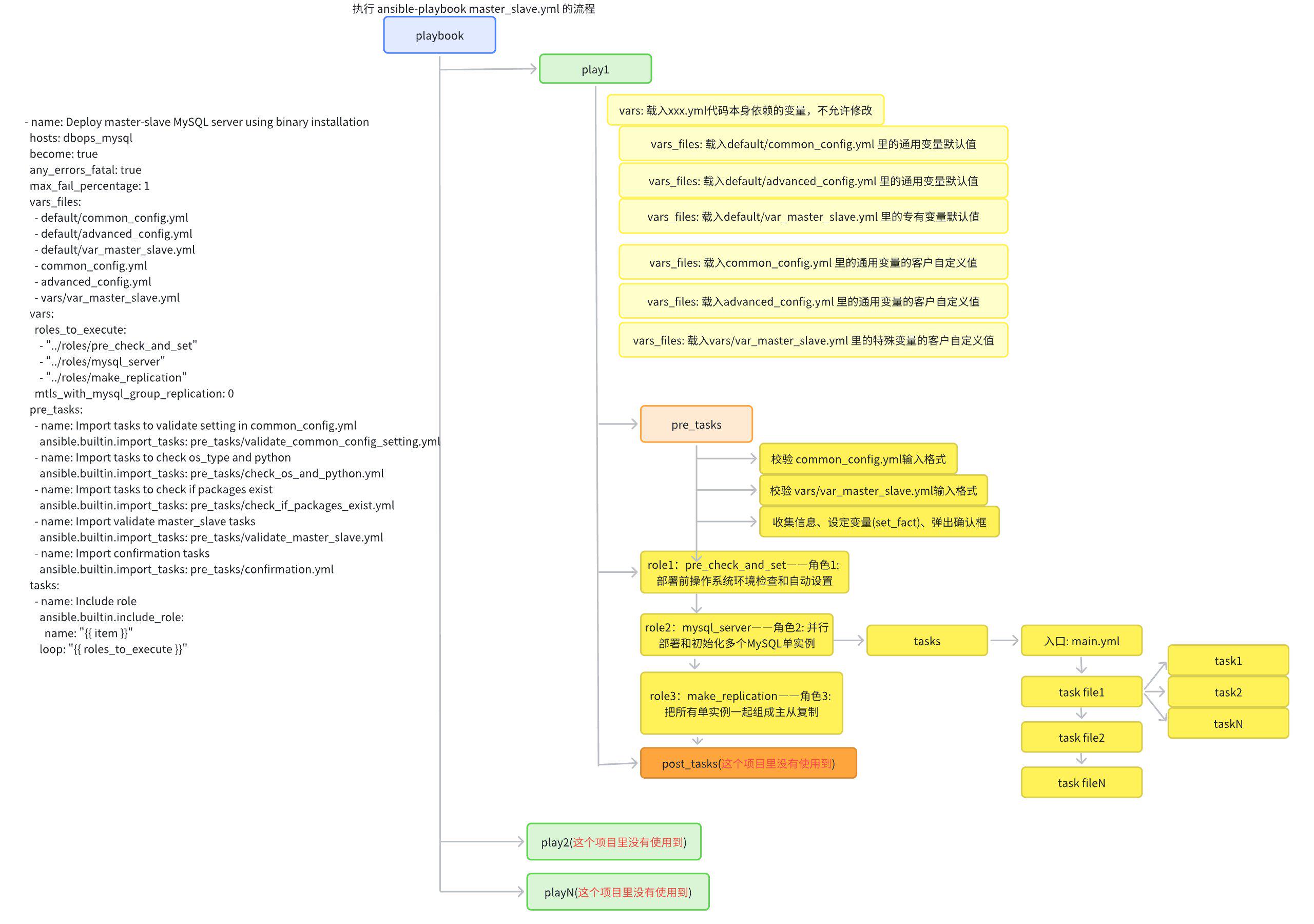
6. Practical suggestions
- Priority modification:
hosts.ini,common_config.yml,vars/var_xxx.yml. - Please verify the high-level directory modification in the test environment first.
- Be sure to confirm the target host range for high-risk scripts.